Google is transitioning third-party smart home account linking to be handled fully and independently within the Google Home app.
Updates to your integration may be needed before October 30, 2026. For more information, see the
Account linking migration guide .
Send feedback
Delete a developer project
Stay organized with collections
Save and categorize content based on your preferences.
The Google Home Developer Console doesn't provide a way to delete
a project. In order to delete a project, you must use the
Google Cloud Dashboard.
Warning: Deleting your Google Home developer project is permanent and cannot be
reversed. If you delete your project and later want to resume the project, you
will have to set up a new project, configure access, set up new
integrations, and so forth. There is no restoration option. First, go to the Google Cloud Console :
Go to Google Cloud console
Click the more_vert menu
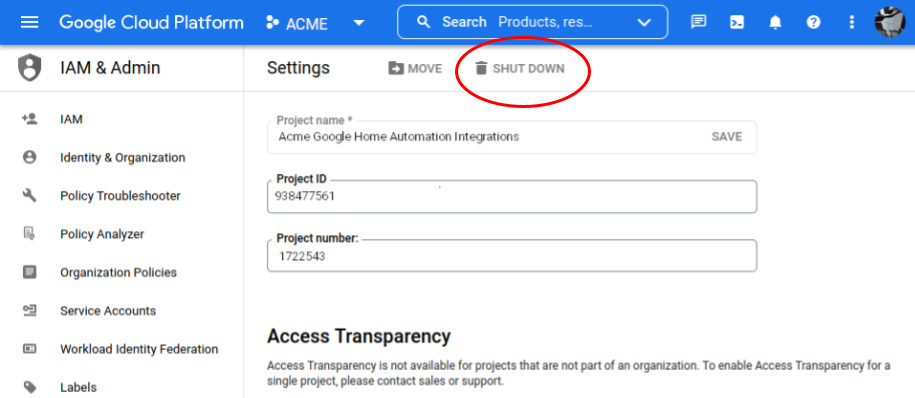
in the upper right and select Project settings .
Click the delete SHUT DOWN link.
Confirm your decision by entering your Project ID in the confirmation dialog
and click SHUT DOWN , or click CANCEL if you change your mind.
Send feedback
Except as otherwise noted, the content of this page is licensed under the Creative Commons Attribution 4.0 License , and code samples are licensed under the Apache 2.0 License . For details, see the Google Developers Site Policies . Java is a registered trademark of Oracle and/or its affiliates.
Last updated 2023-08-01 UTC.
Need to tell us more?
[[["Easy to understand","easyToUnderstand","thumb-up"],["Solved my problem","solvedMyProblem","thumb-up"],["Other","otherUp","thumb-up"]],[["Incorrect information","incorrectInformation","thumb-down"],["Not enough information/samples","notEnoughInformationSamples","thumb-down"],["Too complicated","tooComplicated","thumb-down"],["Other","otherDown","thumb-down"]],["Last updated 2023-08-01 UTC."],[],[]]